


Quick Links

Lawyer Referral Services Guide
- I received a new referral, how do I update the status?
- How do I pay commission fees for my retained cases?
Introduction
Our new online Referral Center is designed to make managing your LRS cases more convenient. The web address for the Referral Center is https://www.kcba.org/?pg=referrals. In order to access the Referral Center on your Member Dashboard page, you must be logged into the site. Don’t forget to bookmark it in your browser! You can also access the Referrals center via the Quick Links box on your Member Dashboard page, which you can reach by clicking on Member Center in the top right of the website, once you are logged in.
Member Dashboard link:

Lawyer Referral Center link in the My Referrals grid at the bottom of your MyKCBA page:
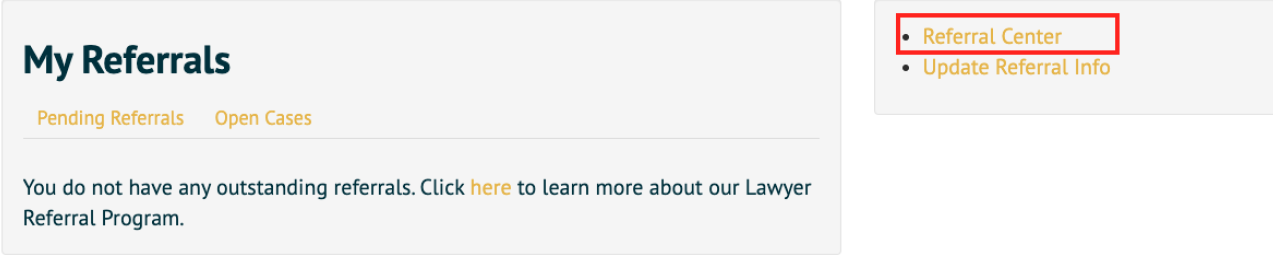 There are four tabs in your Referral Center:
- My Referrals – new referrals just sent to you
- My Retained Cases – open/retained cases
- My Referral/Case History – all current and past referrals/cases
- Panels – Shows your current panels checked and other available panels. You can update your panel selections from here.

I received a new referral, how do I update the status?
New referrals will show up in your My Referrals window. Once you have consulted with the client or determined that you will not be consulting with the client, please click the hyperlinked Referral ID # to open the referral.

Once the referral is open, you can add notes in the Lawyer section of the referral by clicking on "Add Note":
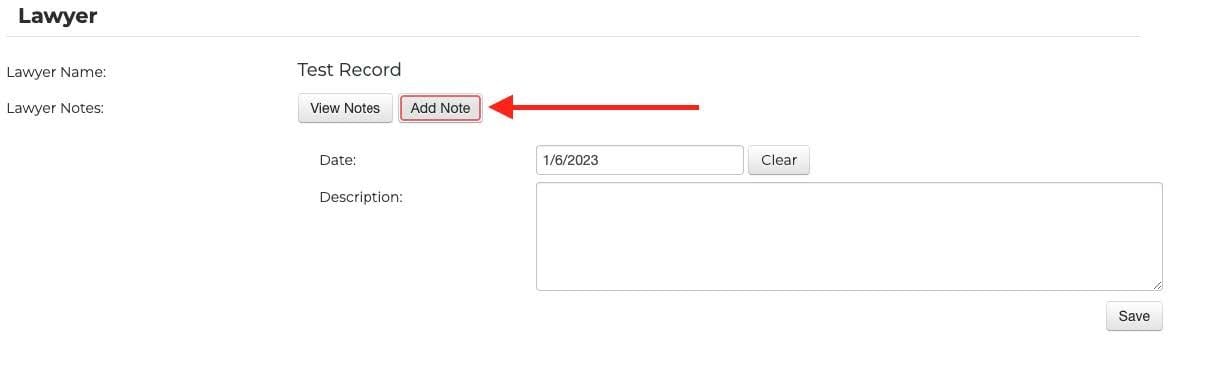 Then you have the option to "Retain Referral" or "Close Referral" by selecting the appropriate button at the top or bottom of the referral:
 If you select "Retain Referral", this means you plan to continue working with the client. When you select this option, you will have two status options:
- Open - Additional Services
- Open - Possible Services
This status change will notify KCBA that you have completed the consultation and will be retaining the case. You can also update the case with any of these Open statuses to let the Bar Association know about the progress of the case.

If you select "Close Referral", you will have a total of four status options, with two available if you have NOT retained the case, and two available if you have retained the case:
- Non-retained Cases
- Closed - Declined Case
- Closed - No Contact
- Retained Cases
- Closed - After Services
- Closed - Consultation Only
This status change will notify KCBA that you do not plan to pursue further work on this referral. The different statuses will let the Bar Association know the reason that you will not be continuing to work the referral.
How do I pay commission fees for my retained cases?
Once you have clicked the button to "Retain Referral" and selected one of the Open statuses, the case will now appear in the "My Retained Cases" tab of your Referral Center. Just as you clicked the hyperlinked Referral# to open the referral and change the status, you will now click the hyperlinked Referral# in the "My Retained Cases" window to:
- Access the case/client information
- Add Lawyer Notes
- Submit Fee Information - Important! The new system requires that you submit the Fee Collected from Client and the system will then use that amount to calculate the Commission Fee you owe. NOTE: If more payments are expected from the client then the case should remain "Open".
- Mark the case status as "Closed", but only if you are not anticipating anymore payments from the client.
Once you enter the amount received from the client and click "Record Fee", the table below will populate with the "Fees Billed" and "Fees Due". You will check the box next to the "Fees Due" that you wish to pay and then click, "Make a Payment" and follow the on-screen prompts.
